stu's eq guide
How I make my voice sound good for voice acting
Copy and pasted from my personal notes.
How I make my voice sound good for voice acting
Copy and pasted from my personal notes.
Note - Before each step, you should select all your audio.
Also make sure to record a bit of silence for noise reduction
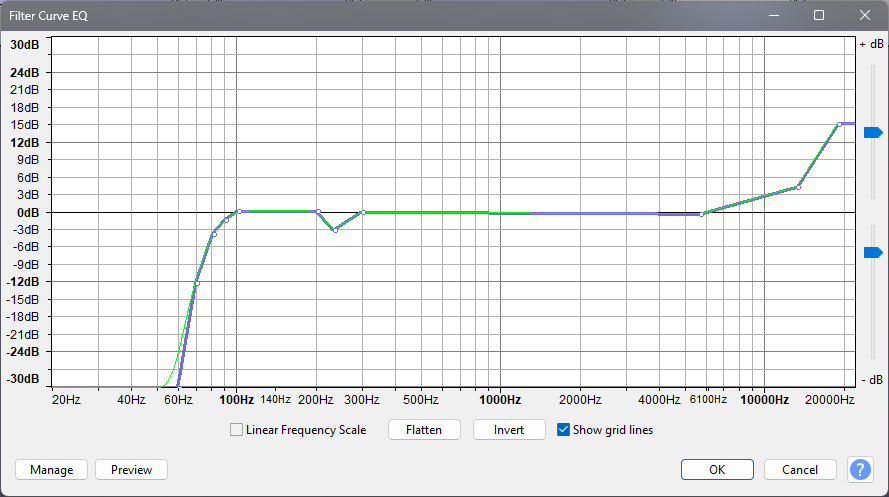
The goal of the filter curve EQ is to remove low frequencies, like fan humming, while boosting higher frequencies where your voice should be.
Tweak this as you see fit, but I find this to work good for my voice.
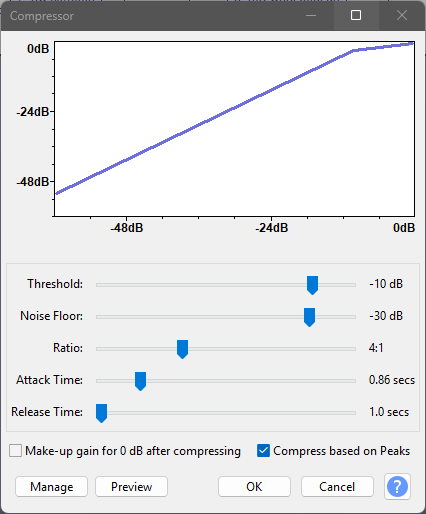
"WTF We're compressing the voice now?!??!!" No, that's not what the compressor does.
The compressor boosts quiet parts while lowering loud ones so the output is balanced. It's a really useful tool!
Also tweak this one as needed. The way it's pictured works fine for me.
Now to get rid of the pesky background noise.
Select the silence clip you recorded, and go to Effect → Noise Reduction. Click on "Get Noise Profile".
Go back to Effect → Noise Reduction, and click on "OK".